We know jailbreaking your iphone or ipod touch voids your warranty.
And you might have to shell out hard earned money to buy those screenshot taking apps in app store.
Also why install something when its already built in.
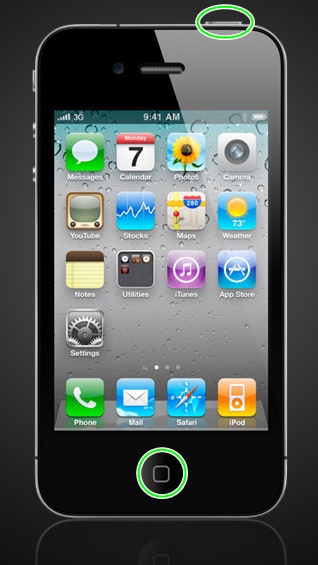
Here’s how you can take a screenshot on your iOS device easily the native way
Actual Screenshot taken using this method
Now you can put the screenshot as your lockscreen wallpaper , good for those hard to remember shopping list or todo list.
Bitwarden is an open-source password manager that helps individuals and organizations securely store, manage, and…
In today's digital age, traditional cable TV is steadily being replaced by more flexible and…
log2ram is a utility specifically designed for Linux-based systems, particularly single-board computers like the Raspberry…
How to Add a ChatGPT Voice Shortcut on iOS and Android With voice commands and…
For occasional VPN or proxy, you do not always need to pay for a reliable…
When it comes to protecting your Mac, Time Machine offers an effortless and powerful way to keep…